Call on behalf of queue in Unified Experience
Call on behalf of queue in the Genesys Cloud interaction window
In the ServiceNow workspace, you can make an outbound call on behalf of a queue using the Genesys Cloud interaction window. The Queue Activation component in the workspace displays the list of queues that you belong to and allows you to activate or deactivate a queue. For each queue, the Select Queue icon is displayed.
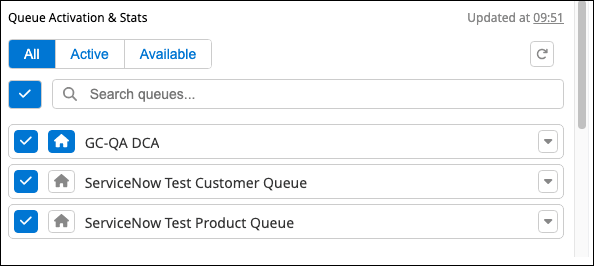
To select a queue, click the Select Queue icon. When selected, the icon is highlighted in blue  and the Genesys Cloud interaction window displays the queue selected:
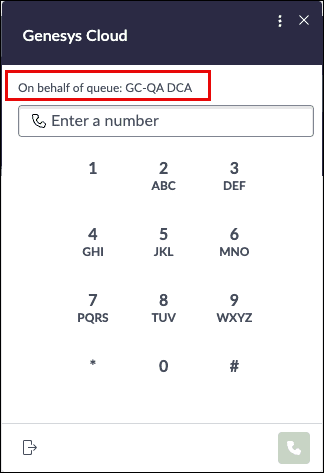
When no queue is selected, the outbound call is not made on behalf of any queue.
For more information, see Use Genesys Cloud components in ServiceNow and Call controls in the ServiceNow UI workspace.
Call on behalf of queue in the ServiceNow Global Call window
Advanced outbound calling enables you to place manual outbound calls in the ServiceNow Global Call window on behalf of a selected queue. The selected queue context is passed to Genesys Cloud for routing.
The queue selected in the Queue Activation component is synchronized with the ServiceNow Global Call window. The queue selection applies to all subsequent outbound calls and remains active until it is changed.

For more information, see Selecting queues for outbound calls in the ServiceNow documentation.
[NEXT] Was this article helpful?
Get user feedback about articles.